
wFirma
The wFirma integration sends invoices and receipts issued in Ritevo to wFirma. You connect it with API keys from the wFirma panel and pick the company the documents should go to.
You can add as many wFirma integrations as you like, including several for the same account - for example with different details or different document settings. Each works on its own.
Which documents it sends
- VAT invoice - goes to wFirma as a VAT invoice or an invoice without VAT, depending on the Invoice with VAT setting on the integration page.
- Receipt - goes to wFirma as a receipt with or without VAT, depending on the Receipt with VAT setting on the integration page.
- Invoice correction - not supported.
How to generate the API key
You create API keys in the wFirma panel. wFirma shows the Secret Key only once, so copy both keys straight away - you will paste them into Ritevo when adding the integration.
- Sign in to wFirma.
- Go to Ustawienia → Bezpieczeństwo → Aplikacje → Klucze API (settings, security, applications, API keys) and click Dodaj (add).
- Enter a name, for example "Ritevo", and confirm with your wFirma password.
- Copy the Access Key and the Secret Key.
Connecting the account
Start in Ritevo:
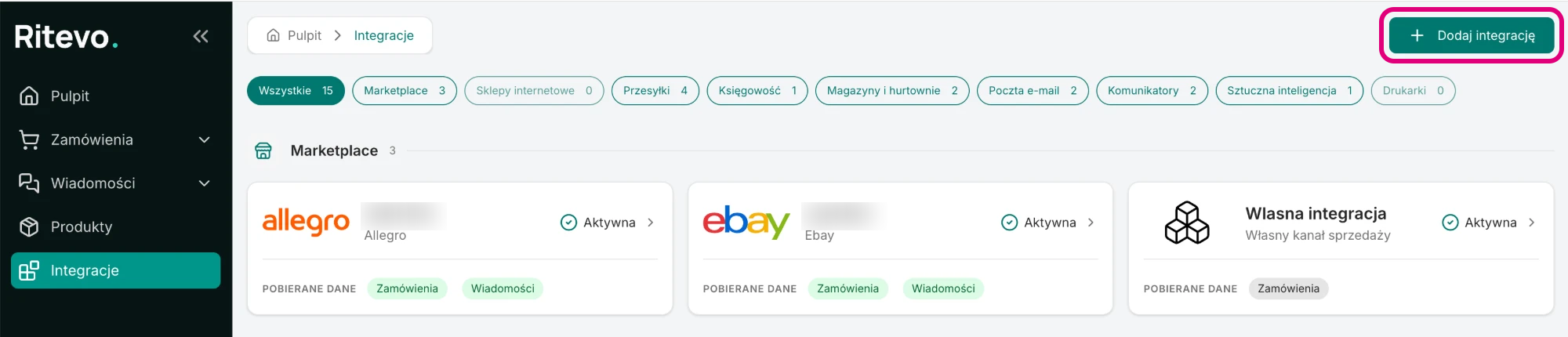
- Go to Integrations in the left panel and click Add integration in the top right corner.
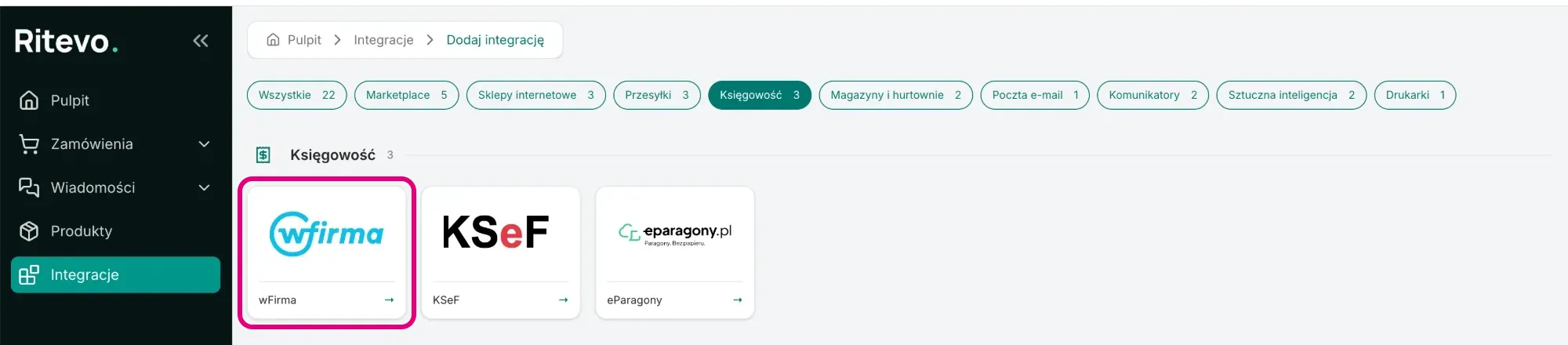
- In the Accounting section pick the wFirma tile.
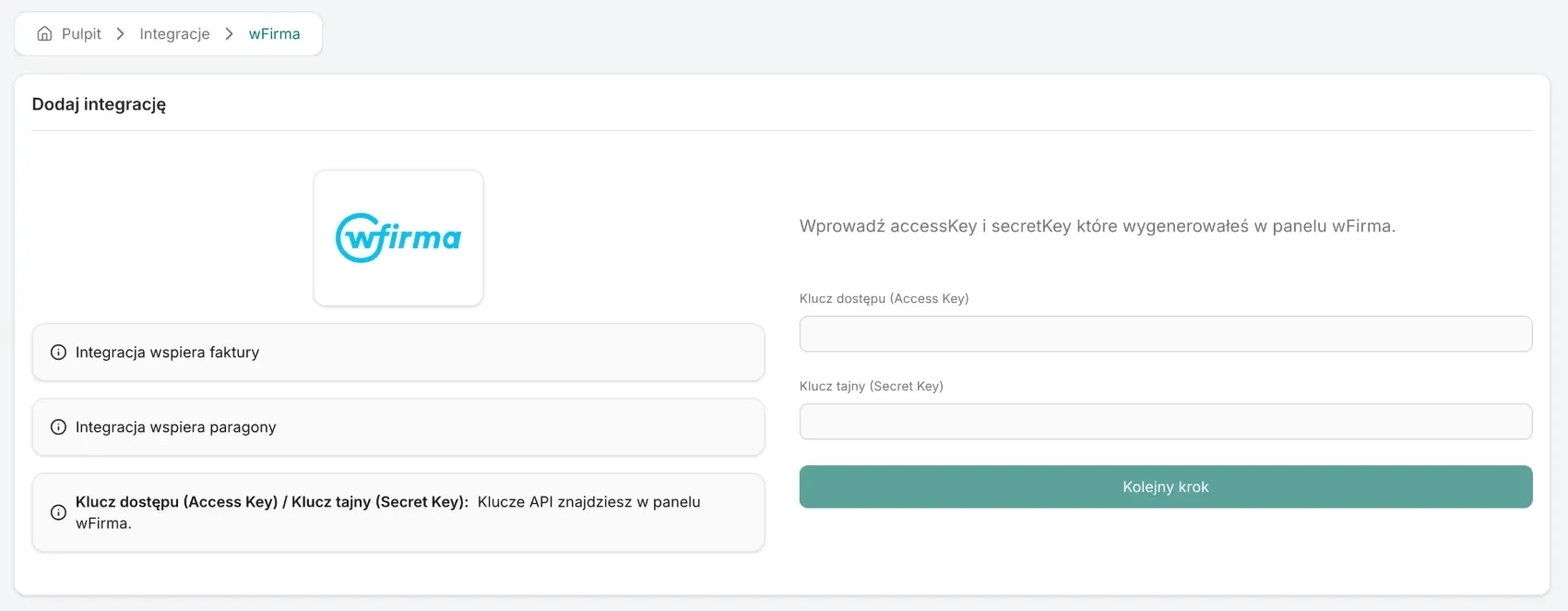
- Paste the Access key (Access Key) and the Secret key (Secret Key) and click Next step. We check the keys in wFirma - if they are wrong, you will see the error returned by wFirma.
- From the Select company list pick the company from your wFirma account and click Create integration. The new integration's settings open.
Integration settings
The integration is named after the company fetched from wFirma - you cannot change it. On the integration page you will find:
- Integration settings - fixed rules: we send gross amounts only, wFirma numbers the document with its own numbering, and wFirma accepts Polish VAT rates only - more below.
- Create contractors - once on, wFirma adds the buyer to its contractor list if they are not there yet. Off by default.
- Invoice with VAT / Invoice without VAT - the kind of invoice created in wFirma. With VAT by default.
- Receipt with VAT / Receipt without VAT - the kind of receipt created in wFirma. With VAT by default.
- Update credentials - you enter new API keys for the same company.
Sending documents
You issue documents in the order. You send them to wFirma in two ways:
- By hand - in the document details, in the External accounting systems card, click the button with the wFirma account name. The button shows up only on documents this integration supports.
- Automatically - with the Send invoice to external accounting or Send receipt to external accounting step in order actions.
Plan sending documents step by step - first issuing, then sending:
- Invoice - the first action ends with the Generate invoice step. The second starts on the Invoice (added/removed) trigger, has the Has invoice condition and the Send invoice to external accounting step.
- Receipt - the same: the first action ends with the Generate receipt step, and the second starts on the Receipt (added/removed) trigger, has the Has receipt condition and the Send receipt to external accounting step.
- Corrections - you can issue many corrections to one invoice. Send each right after issuing it, before you issue the next one.
In the same card every sending has its own icon. Hover over it to see the account, the state and the date:
- Sending - the document is sent and we are waiting for wFirma to confirm it.
- Sent successfully - the document is in wFirma. Click the icon to download or open it.
- Sending failed - the document did not reach wFirma. The reason is shown under the state.
How a document reaches wFirma
- Right away - wFirma answers straight away, so the document is Sent successfully or Sending failed right after sending.
- Number and dates - wFirma assigns the number. The issue date, sale date and payment due date come from the document in Ritevo.
- PDF - clicking the icon downloads the PDF generated by wFirma.
- VAT rates - wFirma accepts 23%, 8%, 5%, 0%, WDT (intra-EU supply), Zw. (exempt) and O.o (reverse charge) from us, and OSS rates are matched to the buyer's country. A document with any other rate is not sent - you will see the Tax rate not supported error.
Reconnection required
This state shows up when wFirma stops accepting the API keys - for example after they were deleted in the wFirma panel. Until you enter new keys, documents will not reach wFirma.
- Generate new API keys in the wFirma panel - the same way as the first time.
- On the integration page click Update credentials, paste both keys and confirm. We check them in wFirma - the keys must have access to the same company. Correct ones refresh the connection, and the settings and the history of sent documents stay unchanged.
Deleting the integration
Delete integration turns the integration off in Ritevo. Documents sent earlier stay in wFirma. Restore integration turns it back on.
What the integration does not do
- It does not send invoice corrections.
- It does not change or delete documents that are already in wFirma.
- It does not fetch documents from wFirma into Ritevo.